

RAGs to riches - AI CVs that tell the truth
CVs written by AI have a terrible reputation, and they've earned it. They're generic, padded with keywords lifted from the job spec, and often contain things that simply aren't true. The industry has rather brilliantly renamed these lies "hallucinations". Recruiters can't tell the wheat from the chaff. And quite often the person who "wrote" the CV doesn't know what's in it either.
I ran a recruitment business for nine years and read thousands of CVs. The ones that stood out were specific. They told me what someone actually did, in their own words. AI-written CVs have made that rarer.
Cory Doctorow introduced me to the idea of automation blindness. When a machine gets things right most of the time, the human supervising it gradually stops being able to spot its mistakes. After a few rounds of pasting in a job description and getting back a polished, keyword-matched CV, people stop reading what comes out. Some of that is laziness, and with your own CV you'd hope for better. But mostly it's just how humans respond to automation.
The result is a waste of everyone's time, and it's poor behaviour. So is there a better way to use AI in a job search? Yes. Here's how I'd do it.
I'll use Claude as the example, but ChatGPT Projects work in much the same way, with project instructions and uploaded files shared across every chat. The method carries over.
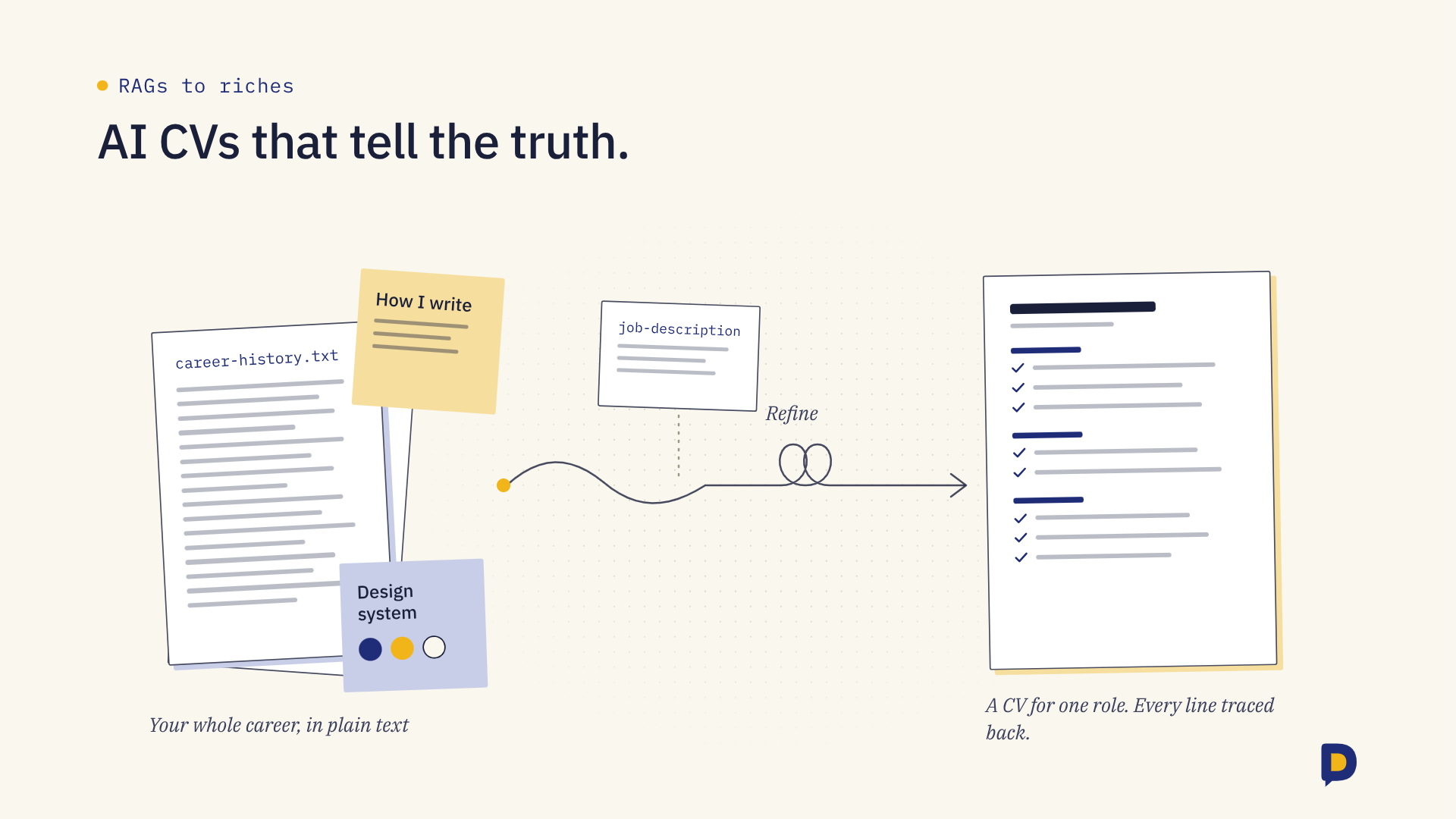
How to write a good, truthful & impactful CV with AI
1. Write your complete career history, not your CV
Start with a plain text file, saved as a .txt, containing your entire career history. Every role, every project, every result, the numbers, the context, the things that went wrong and what you learned. This is a document you'd never send anyone. It's long, messy and exhaustive, and that's the point. Plain text keeps it simple for the AI to read, with no formatting getting in the way. It becomes the single source of truth the AI draws from, so it has no reason to invent anything.
2. Set up a project
Create a project and call it something like "Get a job". Keep everything in here. No separate instruction files scattered across tools, just one place that holds all the context.
This is where the RAG in the title comes in. RAG stands for retrieval-augmented generation. Instead of answering from whatever it absorbed in training, the AI first looks up relevant material from documents you've given it, then writes its answer from that. It's the difference between asking someone to describe your career from memory and handing them your file first.
Strictly speaking, a project with a handful of files loads everything straight into the conversation. Retrieval only kicks in once you've added a lot of material. But the principle is the same. The AI works from your documents, and that's what fixes the core problem with AI-written CVs. They make things up because they have nothing real to work from. Give them something real and the invention stops being necessary.
3. Give it a mini design system
I used Claude Design, but this is really a short set of instructions. Add it to the project files. Things worth including:
Fonts, with sizes for your name, headings and body text
Colours, with hex codes, and where each one is used
Icons, if you use any, and what they represent
Page size and margins, A4 if you're applying in Ireland or the UK
Layout, one column or two, and how much white space
Section order, for example profile, experience, education, skills
How dates, job titles and company names are formatted
Bullet style and how many bullets per role
Maximum length, usually two pages
Output format, typically PDF
A note to keep it readable by applicant tracking systems, so no text inside images and no complex tables
The more specific you are, the more consistent every version will look.
4. Write down how you write
Create a text file called "How I write". Be specific. Words you use and words you'd never use, how long your sentences tend to be, how you feel about bullet points, whether you say "led" or "managed". The more of your own preferences you capture, the less the output sounds like everyone else's. Add this to the project too, alongside the career history.
5. Build a generic CV
Ask the LLM to create a standard, well-designed CV from those three files. Play around with versions until you have one you're genuinely happy with. Then delete the earlier attempts and keep only the final version. That becomes your reference point.
6. Enjoy the fruits of your labour
When you apply for a role, start a new chat inside the project. Paste in the job description and spell out why you think you're a good fit. Ask for a bespoke CV for that role, built from your career history, following your tone and design, using the generic CV for inspiration. Then read it properly. Every line.
The first time I tried this, it described me as having led a team of 40. I never have. The career history file said otherwise, and that's the point of having one.
Save the finished CV and the job description as Google Docs in a "Get a job" folder in Google Drive. Connect Google Drive to Claude, and next time you can ask it to look through that folder before it starts. Over time it builds up a record of every role you've gone for and every CV you've sent, and it can learn from what worked.
7. Make it show its working
Before you send anything, ask it to list every claim in the CV and point to where it came from in your career history. Anything it can't trace gets cut. This is the check that automation blindness makes you skip, so build it into the process.
Refine, refine, refine. You should start getting CVs that are precise, truthful and specific to the role. And because the material is all yours, you'll know exactly what's in them.